Lesson 8 · 8 of 20
Resizable panes · tkinter
Split a tkinter window into panes the user resizes by dragging, with ttk.Panedwindow: horizontal, vertical, nested and weighted.
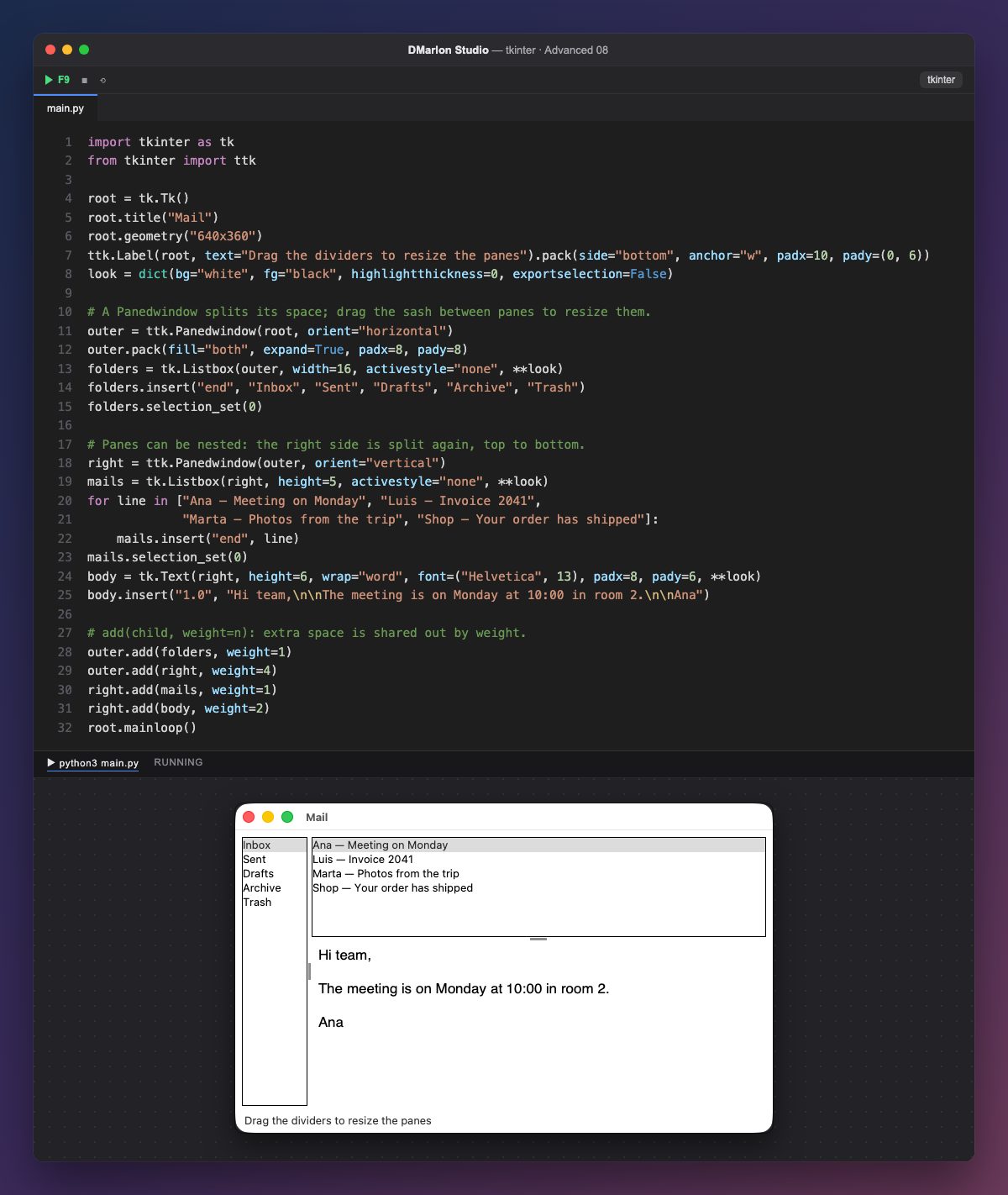
ttk.Panedwindow shares its space among several widgets, the panes, separated by a divider (the sash) you drag with the mouse. orient="horizontal" lays them out in a row and "vertical" in a column.
Panes are added with add(widget, weight=n). The weight decides how spare space is shared when the window grows: the right side has weight 4 and the folders 1, so the mail area grows four times as fast.
They can be nested: the right pane is another Panedwindow, vertical, with the message list on top and the message text below. It is the classic layout of a mail program.
The three widgets share options through the look dictionary and **look. exportselection=False matters: without it, selecting in one list would clear the selection of the other. The label is packed first, with side="bottom", so it is never covered.
From code, sashpos(0, 200) moves the first divider (once the window is shown) and forget(pane) removes a pane. This widget is not in the DMarlon Studio palette, but you can write it in the code of any window you design.
Code · main.py
import tkinter as tkfrom tkinter import ttkroot = tk.Tk()root.title("Mail")root.geometry("640x360")ttk.Label(root, text="Drag the dividers to resize the panes").pack(side="bottom", anchor="w", padx=10, pady=(0, 6))look = dict(bg="white", fg="black", highlightthickness=0, exportselection=False)# A Panedwindow splits its space; drag the sash between panes to resize them.outer = ttk.Panedwindow(root, orient="horizontal")outer.pack(fill="both", expand=True, padx=8, pady=8)folders = tk.Listbox(outer, width=16, activestyle="none", **look)folders.insert("end", "Inbox", "Sent", "Drafts", "Archive", "Trash")folders.selection_set(0)# Panes can be nested: the right side is split again, top to bottom.right = ttk.Panedwindow(outer, orient="vertical")mails = tk.Listbox(right, height=5, activestyle="none", **look)for line in ["Ana — Meeting on Monday", "Luis — Invoice 2041", "Marta — Photos from the trip", "Shop — Your order has shipped"]: mails.insert("end", line)mails.selection_set(0)body = tk.Text(right, height=6, wrap="word", font=("Helvetica", 13), padx=8, pady=6, **look)body.insert("1.0", "Hi team,\n\nThe meeting is on Monday at 10:00 in room 2.\n\nAna")# add(child, weight=n): extra space is shared out by weight.outer.add(folders, weight=1)outer.add(right, weight=4)right.add(mails, weight=1)right.add(body, weight=2)root.mainloop()Key points
add(pane, weight=n)adds a pane with its weight.- The user drags the divider to resize.
Panedwindows can be nested.exportselection=Falsekeeps each list's selection.
Exercise
Add a third pane on the far right with a contact list and weight 1; then change the weights and enlarge the window to see the difference.