Lesson 18 · 18 of 20
Control variables and trace · tkinter
Use tkinter's StringVar, IntVar and BooleanVar with trace_add to recalculate a live total every time a field changes.
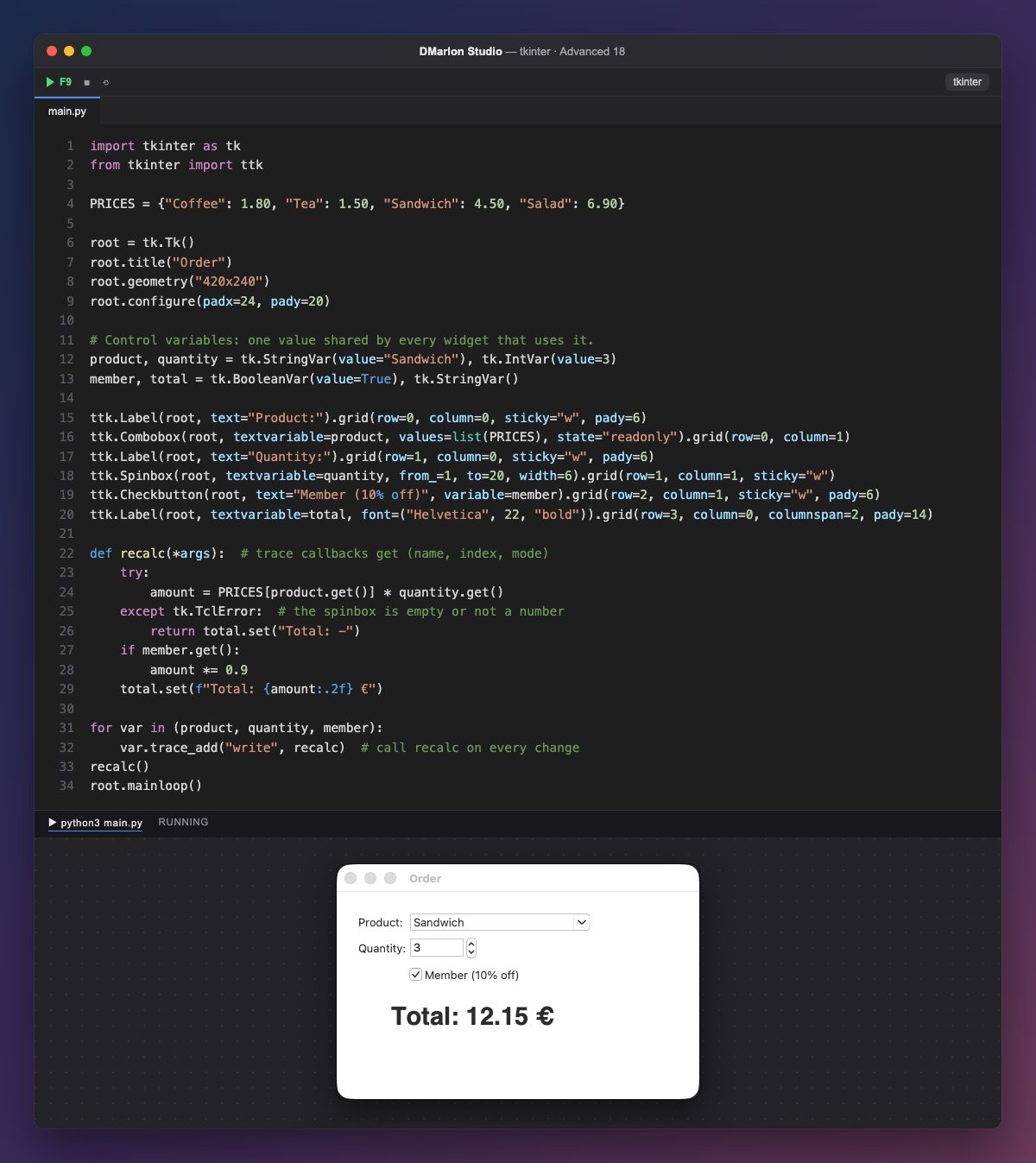
Control variables (StringVar, IntVar, DoubleVar, BooleanVar) hold a value shared by the widgets tied to them: the Combobox with textvariable=product, the Spinbox with quantity, the checkbox with variable=member and the total label with textvariable=total. You read them with get() and change them with set(), and the widget updates itself.
trace_add("write", recalc) asks for recalc to be called every time the variable changes, whether the user or the code changes it. The loop does this for the three variables, so choosing another product, changing the quantity or ticking the box recalculates the total at once.
Trace callbacks get three arguments (the variable's name, an index and the mode) that are not needed here: hence *args. At the end, recalc() is called once by hand so the total shows from the start: 3 × 4.50 € with 10% off is 12.15 €.
IntVar.get() raises tk.TclError if the field is empty or has letters (for example while the user deletes the number). The try catches it and shows "Total: -" instead of breaking the function.
In DMarlon Studio, the studio creates these variables for you: every text field, drop-down list, checkbox or slider has its own (for example, self.Entry1_var), radio buttons share one per group, and you read and change them the same way from code.
Code · main.py
import tkinter as tkfrom tkinter import ttkPRICES = {"Coffee": 1.80, "Tea": 1.50, "Sandwich": 4.50, "Salad": 6.90}root = tk.Tk()root.title("Order")root.geometry("420x240")root.configure(padx=24, pady=20)# Control variables: one value shared by every widget that uses it.product, quantity = tk.StringVar(value="Sandwich"), tk.IntVar(value=3)member, total = tk.BooleanVar(value=True), tk.StringVar()ttk.Label(root, text="Product:").grid(row=0, column=0, sticky="w", pady=6)ttk.Combobox(root, textvariable=product, values=list(PRICES), state="readonly").grid(row=0, column=1)ttk.Label(root, text="Quantity:").grid(row=1, column=0, sticky="w", pady=6)ttk.Spinbox(root, textvariable=quantity, from_=1, to=20, width=6).grid(row=1, column=1, sticky="w")ttk.Checkbutton(root, text="Member (10% off)", variable=member).grid(row=2, column=1, sticky="w", pady=6)ttk.Label(root, textvariable=total, font=("Helvetica", 22, "bold")).grid(row=3, column=0, columnspan=2, pady=14)def recalc(*args): # trace callbacks get (name, index, mode) try: amount = PRICES[product.get()] * quantity.get() except tk.TclError: # the spinbox is empty or not a number return total.set("Total: -") if member.get(): amount *= 0.9 total.set(f"Total: {amount:.2f} €")for var in (product, quantity, member): var.trace_add("write", recalc) # call recalc on every changerecalc()root.mainloop()Key points
- A control variable ties a value to its widgets.
get()reads andset()changes; the screen updates itself.trace_add("write", f)reports every change.IntVar.get()fails on non-numeric text: usetry.
Exercise
Add a "Tip (%)" field with its own IntVar and trace, and add it to the total.